Contact
This page describes the data fields and filters that are available when exporting contact data with the catalogue tool.
This page serves purely as a reference and it assumes that you already have a basic understanding of the catalogue tool.
Export type: Contact
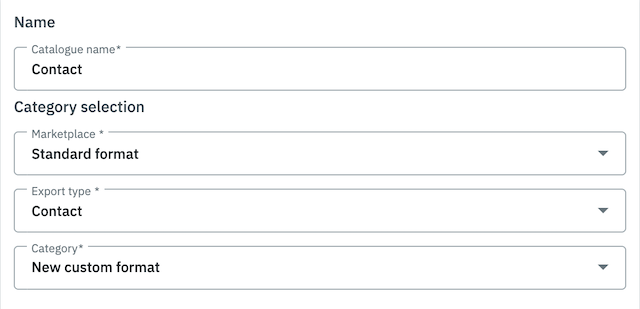
The export type described on this page is found in the menu Data » Catalogues. When creating a new catalogue, you’ll select the standard format from the upper drop-down list. Then you can select the export type Contact from the middle drop-down list.
1. Data fields
This chapter lists all of the contact data fields that can be exported with the catalogue tool.
Data fields are grouped by topic in folders. All data fields of one folder are shown in one table. Thus, the structure of the chapters mirrors the folder structure. Click on one of the following entries in the list to be forwarded directly to the corresponding manual page:
1.1. Contact
| Data field | Explanation |
|---|---|
Contact ID |
Exports the ID of the contact. |
Anonymized at |
Exports the date when the contact was anonymised. |
Birthday |
Exports the contact’s date of birth. |
Contact blocked |
Exports the value |
Book account |
Exports the value that is saved in the debtor account. |
Contact class ID |
Exports the ID of the contact class. |
Created at |
Exports the date when the contact was created. |
External number |
Exports the external number of the contact. |
First name |
Exports the contact’s first name. |
Gender |
Exports the values 0 to 3. |
Language |
Exports the contact’s language. |
Last login at |
Exports the date and time when the contact was logged in for the last time as saved in the History section of the contact data record under Last login. |
Last name |
Exports the contact’s last name. |
Last order at |
Exports the date and time of the contact’s last order as saved in the History section of the contact data record Last order. |
Newsletter allowance at |
Enter the date when the contact registered for your newsletter. |
Contact number |
Exports the contact’s customer number. |
Plenty ID (client ID) |
The ID is saved in the Setup » Client » [Select client] » Settings menu. |
Rating |
Exports the rating saved for the contact.
|
Referrer ID |
Exports the ID of the referrer. |
Sales representative ID |
Exports the ID of the sales representative. |
Title |
Exports the title of the contact. |
Type ID |
Exports the ID of the contact type. Possible values:
|
Updated at |
Exports the date and time when the contact was updated the last time as saved in the History section of the contact data record under Updated. |
User ID |
Exports the ID of the user. |
1.2. Allowed method of payment
| Data field | Explanation |
|---|---|
Allow debit |
Exports the values |
Allow invoice |
Exports the values |
1.3. Invoice address
| Data field | Explanation |
|---|---|
ID of invoice address |
Exports the ID of the invoice address. |
Street of invoice address (Address 1) |
Exports the street (address 1) that is saved in the invoice address. |
House number of invoice address (Address 2) |
Exports the house number (address 2) that is saved in the invoice address. |
Additional address information of invoice address (Address 3) |
Exports the additional address information (address 3) that is saved in the invoice address. |
Address 4 of invoice address |
Exports the value that is saved in the invoice address under address 4. |
Checked at of invoice address |
This field is not visible in the PlentyONE back end, but can be set via REST. If a value is available, it will be included in the export file. |
Country ID of invoice address |
Exports the ID of the country that is saved in the invoice address. |
Invoice address country |
Exports the country that is saved in the invoice address. The country name is in the same language as your system language. |
Invoice address ISO code 1 |
Exports the ISO code 1 that is saved in the invoice address. |
Invoice address ISO code 2 |
Exports the ISO code 2 that is saved in the invoice address. |
Company of invoice address (Name 1) |
Exports the company (name 1) that is saved in the invoice address. |
First name of invoice address (Name 2) |
Exports the first name (name 2) that is saved in the invoice address. |
Last name of invoice address (Name 3) |
Exports the last name (name 3) that is saved in the invoice address. |
Additional information of invoice address (Name 4) |
Exports the additional information (name 4) that is saved in the invoice address. |
Postcode of invoice address |
Exports the postcode that is saved in the invoice address. |
State ID of invoice address |
Exports the ID of the state that is saved in the invoice address. |
Town of invoice address |
Exports the town that is saved in the invoice address. |
Is primary of invoice address |
Exports the value whether the invoice address is the primary invoice address or not. |
1.4. Invoice address options
| Data field | Explanation |
|---|---|
Email address of invoice address |
Exports the email address that is saved in the invoice address. |
Age rating of invoice address |
Exports the age rating that is saved in the invoice address. |
Date of birth of invoice address |
Exports the date of birth that is saved in the invoice address. |
Contact person of invoice address |
Exports the contact person that is saved in the invoice address. |
Entry certificate of invoice address |
Exports the values |
External address ID of invoice address |
Exports the external address ID of the invoice address. |
External customer ID of invoice address |
Exports the external customer ID that is saved in the invoice address. |
Personal ID of invoice address |
Exports the personal ID that is saved in the invoice address. |
Post number of invoice address |
Exports the post number that is saved in the invoice address. |
Session ID of invoice address |
The session ID is not visible in the PlentyONE back end, but can be set via REST. If a session ID is available, it will be included in the export file. |
Telephone number of invoice address |
Exports the telephone number that is saved in the invoice address. |
Title of invoice address |
Exports the title that is saved in the invoice address. |
VAT number of invoice address |
Exports the VAT identification number that is saved in the invoice address. |
1.5. Company
| Data field | Explanation |
|---|---|
Company ID |
Exports the ID of the company. |
Company name |
Exports the name of the company. |
Dealer min. order value |
Exports the supplier’s minimum order value that is saved in the company data record. |
Delivery time |
Exports the delivery time that is saved in the company data record. |
Early payment discount in days |
Exports the days for early payment discount that are saved in the company data record. |
Percentage for early payment discount |
Exports the percentage for early payment discount that is saved in the company data record. |
Number |
The company number is not visible in the PlentyONE back end, but can be set via REST. If a number is available, it will be included in the export file. |
Sales representative contact ID |
Exports the contact ID of the sales representative that is linked to the contact. |
Supplier currency |
Exports the supplier’s currency that is saved in the company data record. |
Tax ID number |
Exports the VAT identification number that is saved in the company data record. |
Time for payment allowed in days |
Exports the payment due date in days that is saved in the company data record. |
user ID |
Exports the ID of the owner that is saved in the company data record. |
1.6. Bank details
| Data field | Explanation |
|---|---|
Bank details ID |
Exports the ID of the bank details record that is saved in the Bank details section of the contact data record. |
Account number |
Exports the account number that is saved in the Bank details section of the contact data record. |
Account owner |
Exports the holder that is saved in the Bank details section of the contact data record. |
Bank address |
Exports the bank address that is saved in the Bank details section of the contact data record. |
Bank country |
Exports the country of the bank that is saved in the Bank details section of the contact data record. |
Bank name |
Exports the bank name that is saved in the Bank details section of the contact data record. |
Bank postcode and town |
Exports the postcode and town of the bank that is saved in the Bank details section of the contact data record. |
BIC |
Exports the BIC of the contact that is saved in the Bank details section of the contact data record. |
Linked contact ID |
Exports the contact ID that is linked to the bank details. |
SEPA direct debit mandate at |
Exports the date when the SEPA direct debit mandate was granted. |
SEPA direct debit mandate available |
Exports the values |
Type of SEPA direct debit mandate |
Exports the type of the SEPA direct debit mandate.
Possible values: |
SEPA payment method |
Exports the values |
IBAN |
Exports the IBAN of the contact. |
Last change by |
Exports the date and time of the last change. |
Sort code |
Exports the bank code of the contact. |
1.7. Contact options
| Data field | Explanation |
|---|---|
Is guest |
Exports the value that is saved in the contact options under Access Guest. |
Access marketplace partner |
Exports the value that is saved in the contact options under Access Marketplace partner. |
Contact person |
Exports the contact person that is saved in the contact options. |
Follow-up date |
Exports the follow-up date that is saved in the contact options. |
Email PayPal |
Exports the PayPal email address that is saved in the contact options. |
Email private |
Exports the private email address that is saved in the contact options. |
Email work |
Exports the work email address that is saved in the contact options. |
Group forum |
Exports the value that is saved in the contact options under Group Forum. |
Identification number DHL |
Exports the DHL identification number that is saved in the contact options. |
Identification number Klarna |
Exports the Klarna identification number that is saved in the contact options. |
Marketplace Amazon |
Exports the value that is saved in the contact options under Marketplace Amazon. |
Marketplace eBay |
Exports the value that is saved in the contact options under Marketplace eBay. |
Default payment method |
Exports the value that is saved for the default payment method in the contact options. |
Payment method Klarna |
Exports the value that is saved in the contact options under Payment Klarna. |
Payment method Mollie |
Exports the value that is saved in the contact options under Payment Mollie. |
Payment method PayPal |
Exports the value that is saved in the contact options under Payment PayPal. |
Salutation private |
Exports the private form of address that is saved in the contact options. |
Salutation work |
Exports the work form of address that is saved in the contact options. |
Telefax private |
Exports the private fax number that is saved in the contact options. |
Telefax work |
Exports the work fax number that is saved in the contact options. |
Telephone mobile private |
Exports the private mobile phone number that is saved in the contact options. |
Telephone mobile work |
Exports the work mobile phone number that is saved in the contact options. |
Telephone private |
Exports the private phone number that is saved in the contact options. |
Telephone work |
Exports the work phone number that is saved in the contact options. |
User name forum |
Exports the user name from forum that is saved in the contact options. |
User name private |
Exports the private user name that is saved in the contact options. |
User name work |
Exports the work user name that is saved in the contact options. |
Web page private |
Exports the private web page that is saved in the contact options. |
Web page work |
Exports the work web page that is saved in the contact options. |
1.8. Contact properties
| Data field | Explanation |
|---|---|
Contact property ID |
Exports the ID of the contact property. |
All |
Exports all data that is saved for the property. |
Linked contact ID |
Exports the ID of the contact that is linked with the property. |
Property type |
Exports the property type.
|
Property value |
Exports the value of the property. |
1.9. Delivery address
| Data field | Explanation |
|---|---|
ID of delivery address |
Exports the ID of the delivery address. |
Street of delivery address (Address 1) |
Exports the street (address 1) that is saved in the delivery address. |
House number of delivery address (Address 2) |
Exports the house number (address 2) that is saved in the delivery address. |
Additional address information of delivery address (Address 3) |
Exports the additional address information (address 3) that is saved in the delivery address. |
Address 4 of delivery address |
Exports the value that is saved in the delivery address under address 4. |
Checked at of delivery address |
This field is not visible in the PlentyONE back end, but can be set via REST. If a value is available, it will be included in the export file. |
Country ID of delivery address |
Exports the ID of the country that is saved in the delivery address. |
Delivery address country |
Exports the country that is saved in the delivery address. The country name is in the same language as your system language. |
Delivery address ISO code 1 |
Exports the ISO code 1 that is saved in the delivery address. |
Delivery address ISO code 2 |
Exports the ISO code 2 that is saved in the delivery address. |
Company of delivery address (Name 1) |
Exports the company (name 1) that is saved in the delivery address. |
First name of delivery address (Name 2) |
Exports the first name (name 2) that is saved in the delivery address. |
Last name of delivery address (Name 3) |
Exports the last name (name 3) that is saved in the delivery address. |
Additional information of delivery address (Name 4) |
Exports the additional information (name 4) that is saved in the delivery address. |
Postcode of delivery address |
Exports the postcode that is saved in the delivery address. |
State ID of delivery address |
Exports the ID of the state that is saved in the delivery address. |
Town of delivery address |
Exports the town that is saved in the delivery address. |
Is primary of delivery address |
Exports the value whether the delivery address is the primary delivery address or not. |
1.10. Delivery address options
| Data field | Explanation |
|---|---|
Email address of delivery address |
Exports the email address that is saved in the delivery address. |
Age rating of delivery address |
Exports the age rating that is saved in the delivery address. |
Date of birth delivery address |
Exports the date of birth that is saved in the delivery address. |
Contact person of delivery address |
Exports the contact person that is saved in the delivery address. |
Entry certificate of delivery address |
Exports the values |
External address ID of delivery address |
Exports the external address ID of the delivery address. |
External customer ID of delivery address |
Exports the external customer ID that is saved in the delivery address. |
Personal ID of delivery address |
Exports the personal ID that is saved in the delivery address. |
Post number of delivery address |
Exports the post number that is saved in the delivery address. |
Session ID of delivery address |
The session ID is not visible in the PlentyONE back end, but can be set via REST. If a session ID is available, it will be included in the export file. |
Telephone number of delivery address |
Exports the telephone number that is saved in the delivery address. |
Title of delivery address |
Exports the title that is saved in the delivery address. |
VAT number of delivery address |
Exports the VAT identification number that is saved in the delivery address. |
1.11. Sales representative region
| Data field | Explanation |
|---|---|
Region ID of sales representative |
Exports the ID of the region of the sales representative. |
Country ID of sales representative |
Exports the ID of the country of the sales representative. |
Postcode area of sales representative |
Exports the postcode area within which the sales representative is working. |
1.12. Tags
| Data field | Explanation |
|---|---|
Tag ID |
Exports the ID of the tag. |
1.13. Contact class
| Data field | Explanation |
|---|---|
Discount days of contact class |
Exports the early payment discount in days that is saved in the customer class. |
Discount percent of the contact class |
Exports the percentage for early payment discount that is saved in the customer class. |
Time for payment allowed of contact class |
Exports the payment due date in days that is saved in the customer class. |
Valuta of contact class |
Exports the valuta that is saved in the customer class. |
2. Filters
This chapter lists all of the filters that you can use to limit which contacts are included in the export file.
| Filter | Explanation |
|---|---|
Contact ID |
Limits the export to contacts with a specific ID. Available operators:
|
Client |
Limits the export to contacts assigned to the selected client. |
Contact class |
Limits the export to contacts with the selected customer class. You can select more than one classes for this filter. |
Country |
Limits the export to contacts assigned to the selected country. |
Direct debit mandate |
Decide whether the export should include contacts with a direct debit mandate or not. |
IBAN |
Decide whether the export should include contacts with an IBAN or not. |
Owner |
Limits the export to contacts assigned to the selected owner. You can select more than one owner for this filter. |
Rating |
Limits the export to contacts with the selected rating. You can select more than one rating for this filter. |
Referrer |
Limits the export to contacts with the selected referrer. You can select more than one referrer for this filter. |
Type |
Limits the export to contacts of the selected type. You can select more than one type for this filter. |
Tags |
Limits the export to contacts with the selected tag. You can select more than one tag for this filter. |
Export all contact addresses |
Decide whether the export should include all contact addresses or not. |
Contact created at |
Limits the export to contacts that were created on a specific date. Available operators:
|