Flow templates
Flow templates provide an easy way to get started with Flow. Standard workflows are available, which you can customise to suit your needs.
You can find the Flow templates in the Flow overview under Automation » Flow Studio.
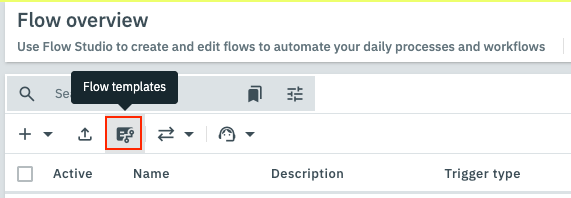
Open them either via the Flow templates button in the toolbar:
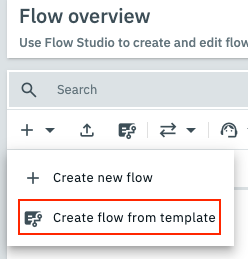
or by clicking on Create new flow (add) in the toolbar and then on Create flow from template:
1. Available flow templates
The following flow templates are currently available to you.
The list of available templates is continuously being expanded.
1.1. Template group Order
| Template | Explanation |
|---|---|
Send email with invoice |
This flow sends the invoice by email. Select an email template and recipient to decide who the invoice will be sent to. |
Register shipment |
This flow registers a shipment after items are booked out and then informs customers by email. Select an email template and recipients to decide who will be informed about the shipment. |
Book outgoing items & create documents |
This flow books the outgoing items of an order and then creates invoice and delivery note. |
Payment reminder |
This flow searches daily for open invoice amounts, sends a payment reminder and adapts the dunning level. |
2. Using a Flow template
-
Go to Automation » Flow Studio.
-
In the toolbar, click either Flow templates or Create new flow (add) and then Create flow from template.
→ The Flow templates window opens. -
Select the area from which you want to use a template and then the corresponding template, or enter a term in the search field.
-
Click on Create flow from template.
→ A flow is created according to the template and opened directly. It also appears under the name of the template in the flow overview. -
Make adjustments in the template: Most actions and triggers require individual settings.
-
Save your settings.
-
Activate your flow in the flow overview.
|
Know your limit
All flows created from templates count towards your flow limit. Once the limit is reached, no further flows can be added. |